
Phone photography in Etosha works best when the photographer accepts two facts: animals may be far away, and midday heat can soften even a perfectly focused image. A newer phone cannot remove atmosphere between the lens and a lion on the horizon.
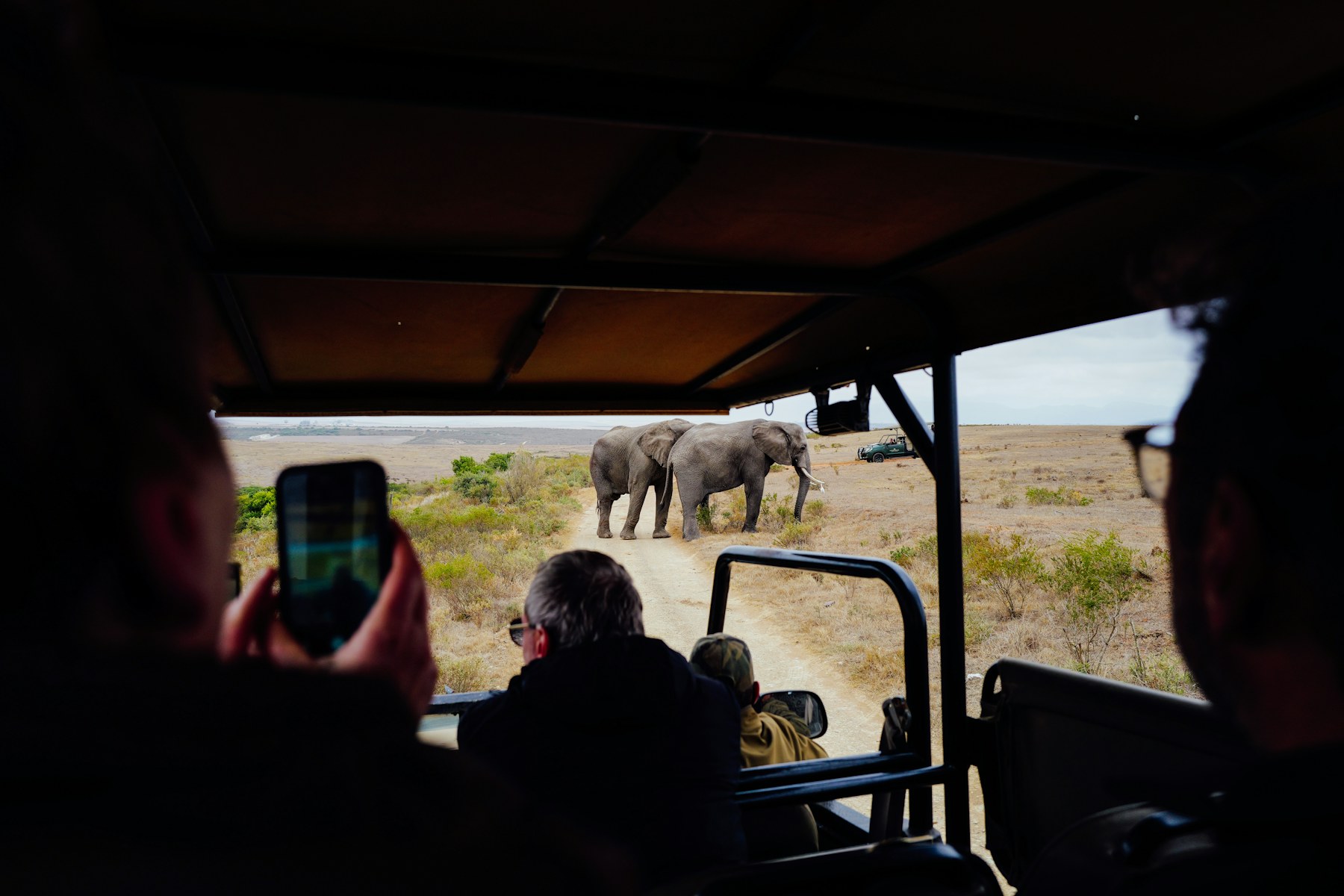
That is not a reason to stop photographing. Phones are excellent for landscapes, animals close to the road, behaviour sequences, people inside the vehicle and short videos with natural sound. The key is choosing a subject that suits the device instead of chasing extreme digital magnification.
Use these techniques to make clearer, more honest safari images while keeping the vehicle quiet, respecting wildlife and enjoying the sighting beyond the screen.
In this guide
- Why distance and heat haze matter
- Choose optical zoom over digital zoom
- Stabilise the phone inside a vehicle
- Expose for pale pan and dark animals
- Protect the device from heat and dust
- Eleven phone-photography habits
Why phone photography in Etosha looks soft
Heat haze is moving air with layers of different temperature and density. Across a long, sunlit distance it bends light irregularly, making edges shimmer. No amount of tapping the animal on screen can recover detail the atmosphere has already distorted.
The effect is often strongest over pale roads and open pan margins during the hotter part of the day. Photograph earlier, move only when normal route travel offers a better angle, or make a wider environmental image. Never drive closer illegally or crowd an animal for the sake of sharpness.
| Problem | What helps | What usually fails |
|---|---|---|
| Heat haze | Cooler hours and shorter distance | Extra sharpening |
| Small subject | Wider composition with habitat | Heavy digital zoom |
| Vehicle vibration | Engine off where safe and permitted | One-handed shooting |
| Bright pan | Exposure compensation and HDR care | Lifting a badly clipped sky |
Use the phone’s real lenses
If the phone has several lenses, learn the marked optical steps before the drive. The 2×, 3× or 5× option may switch to a separate lens in good light, while in poor light the software may crop the main camera instead. Test at home so the interface is familiar.
Pinch zoom invites excessive magnification. Stop at a sensible optical step, include the landscape and crop modestly later. Etosha’s scale is part of the story: a springbok on the pan or elephant beneath an enormous sky can be stronger than a low-detail close-up.
Stability inside the safari vehicle
Support both hands, rest elbows against the body and avoid touching a vibrating window frame. Ask the driver to switch off only when it is safe, legal and considerate of traffic. Take a short burst as the animal pauses, then keep the best frame.
Clean the phone lens frequently with a proper cloth. Sunscreen fingerprints cause flare and make images look hazy even when the air is clear. Do not lean outside, hold the phone above the roofline or block another traveller’s view.
- Brace elbows rather than the phone against the vehicle.
- Use the volume button as a shutter if it reduces movement.
- Choose a faster shutter or action mode for walking animals.
- Record short clips instead of one long, shaky video.
- Keep the horizon level when the pan dominates the frame.
- Turn off notification sounds before the first sighting.
Add interpretation to the photographs
A guided game drive can help identify behaviour and position the group responsibly, allowing phone users to anticipate moments instead of reacting after they happen.
Exposure for pale landscapes and dark animals
A bright pan can persuade the camera to underexpose a dark animal. Tap the animal and adjust the exposure slider slightly, watching that the sky does not become a blank white area. HDR can help with a still subject, but moving ears, legs or birds may create ghosted edges.
Photograph one safer exposure, then a slightly darker and lighter version if the sighting is calm. Avoid spending the entire moment inside menus. The related Etosha Pan wildlife guide offers ideas for composing animals within the wider salt-pan landscape.
A wide frame is not a failed close-up
Show tracks, dust, vegetation, clouds or other animals around the subject. Environmental photographs often communicate Etosha more accurately than a tightly cropped, artificially sharpened animal.
Keep the phone cool, powered and clean
Direct sun through a vehicle window can overheat a phone and dim the screen or stop recording. Keep it shaded when not in use, never cool it abruptly with ice or a refrigerator, and remove a thick case temporarily only if the device remains protected from drops and dust.
Carry a charged power bank and short cable secured away from pedals and doors. Back up photographs on lodge Wi-Fi when available, but keep offline maps and emergency battery needs ahead of constant uploading. Camera controls vary by model; Apple’s official iPhone camera-settings guide is one example of the manufacturer documentation worth reading before the trip.
Edit honestly after the drive
Crop, straighten and adjust colour gently. Strong clarity, dehaze and AI enlargement can invent texture, halo an animal and make a distant scene look unnatural. Keep the original file and disclose major compositing or generative changes if an image will be presented as wildlife documentation.
Do not share precise locations of sensitive animals in real time. Remove embedded location data when appropriate and follow guidance from park staff or conservation organisations. The image should never increase pressure on the subject.
Eleven powerful phone-photography habits
A repeatable routine improves results more than a new app downloaded at the gate.
- Clean the lens before departure.
- Enable grid lines.
- Know the optical lens steps.
- Keep digital zoom modest.
- Shoot early when haze is lower.
- Brace the body and pause breathing.
- Watch the background as carefully as the animal.
- Lower the screen brightness at shared sightings.
- Record behaviour, not only portraits.
- Back up after the drive.
- Put the phone down for part of every sighting.
Ten field exercises for phone photography in Etosha
These exercises make phone photography in Etosha slower, more evidence-based and easier to share. Complete one or two at each suitable sighting rather than turning wildlife into a classroom task. The subject’s comfort and the open road always come before finishing the exercise.
1. Why phone photography in Etosha looks soft
Begin the field exercise with “Why phone photography in Etosha looks soft” and spend one full minute describing only visible facts. Note shape, direction, distance, posture, light and movement before naming a species or cause. This disciplined pause makes phone photography in Etosha more accurate and gives other travellers time to see the scene for themselves.
2. Use the phone’s real lenses
Use “Use the phone’s real lenses” to practise a near-to-far scan. Check the road edge and immediate shade, then work across middle distance in overlapping strips before reaching the horizon. A large subject can disappear close to the vehicle when everyone begins with binoculars aimed at a famous distant landmark.
3. Stability inside the safari vehicle
Compare at least two independent clues around “Stability inside the safari vehicle”. Structure and behaviour may support one another; colour and a brief glance may not. In phone photography in Etosha, confidence should rise only when separate observations agree, and it should remain low when heat haze, vegetation or poor light hides the key feature.
4. Exposure for pale landscapes and dark animals
Set an observation block for “Exposure for pale landscapes and dark animals” before changing position. Continuous creeping interrupts both wildlife and other viewers, while a stable vehicle lets patterns develop. Move only when the route is legal, the driver has checked mirrors and the new position does not close an animal’s path.
5. Keep the phone cool, powered and clean
Make a short note about “Keep the phone cool, powered and clean” using time, broad sector, weather and behaviour. Do not publish a sensitive exact location in real time. A simple evidence record makes later identification possible and keeps phone photography in Etosha focused on learning rather than on being first with an online report.
6. Edit honestly after the drive
Photograph “Edit honestly after the drive” only after completing the initial observation. Take a short burst, keep flash and artificial calls off, and preserve the uncropped original. Digital sharpening or AI enlargement can invent edges, so the final caption should not claim detail that was invisible in the field.
7. Eleven powerful phone-photography habits
Ask what would disprove the first interpretation of “Eleven powerful phone-photography habits”. An animal may be watching a vehicle rather than a predator; a circling bird may be using a thermal rather than locating food. This deliberate alternative keeps phone photography in Etosha honest and reduces excited announcements that cause traffic.
8. safari phone photography
Watch how “safari phone photography” changes over several minutes. Feeding resumed, ears relaxed, flight direction shifted or a group dispersed may be as informative as the first alert. phone photography in Etosha benefits from sequences, because a single frozen moment often exaggerates tension or hides normal behaviour.
9. heat haze
Share “heat haze” quietly by giving a direction, distance and landmark rather than pointing across another person’s face. Allow children or new birders time to find it. A calm description improves the entire vehicle’s phone photography in Etosha experience without increasing noise or pressure on the subject.
10. wildlife composition
End the “wildlife composition” exercise when the animal responds to the vehicle, the road becomes congested, heat or fatigue reduces attention, or the schedule requires movement. Leaving responsibly is part of phone photography in Etosha. The strongest field note is not worth disturbing wildlife or creating a dangerous blockage.
11. mobile camera tips
Use “mobile camera tips” to compare naked-eye and binocular views. Begin without magnification to understand position and movement, then use optics for detail. phone photography in Etosha becomes less disorienting when the observer can return to the wider scene and explain where the subject sits relative to road, shade and other animals.
12. Why distance and heat haze matter
Check light direction while observing “Why distance and heat haze matter”. Backlight can hide colour but strengthen silhouette; side light may reveal shape; heat can soften every edge. Instead of moving aggressively, adapt the phone photography in Etosha description to what the light supports and wait for a lawful natural change.
13. Choose optical zoom over digital zoom
Invite a second observer to describe “Choose optical zoom over digital zoom” independently before comparing conclusions. Agreement on direction and structure increases confidence; disagreement exposes a feature worth rechecking. Shared phone photography in Etosha should improve evidence, not pressure the less experienced person to repeat the loudest identification.
14. Stabilise the phone inside a vehicle
Note absence around “Stabilise the phone inside a vehicle” as carefully as presence. A quiet waterhole, empty branch or relaxed herd can still shape the next scan. phone photography in Etosha is stronger when it records what was checked and not found, because later memory otherwise fills the scene with details suggested by photographs or conversation.
15. Expose for pale pan and dark animals
Keep “Expose for pale pan and dark animals” within the subject’s natural context. A tightly cropped image may remove other pride members, habitat or the vehicle pressure that explains behaviour. Good phone photography in Etosha combines one detail view with a wider frame and a caption that states uncertainty instead of inventing a complete story.
16. Protect the device from heat and dust
Finish “Protect the device from heat and dust” by putting equipment down for one uninterrupted minute. Watch with normal vision and listen. This final phone photography in Etosha habit reduces screen fatigue, catches behaviour outside the frame and preserves part of the experience as a memory rather than only as a file to edit.
At the end of the day, select the strongest phone photography in Etosha note and explain which evidence made it reliable. Also keep one uncertain observation. Learning why it remained uncertain is often more valuable than attaching a confident name to every photograph. Compare the notes with a current field guide or authoritative conservation source, but do not rewrite the original observation to match the answer. Preserve what was truly visible, identify which feature resolved the question and leave the record unresolved when the evidence remains incomplete. This creates a useful learning trail and prevents hindsight from turning a distant shape into a falsely perfect sighting. Add the route, light direction and viewing duration while they are fresh. Those details often explain why another photograph from the same sequence appears sharper, darker or more confident without providing genuinely different evidence.
A phone photography in Etosha field routine
Keep phone photography in Etosha simple: clean the lens, select a real optical step, brace and take a short burst. Phone photography in Etosha improves when the subject suits the distance. Good phone photography in Etosha also includes time with the screen lowered.
Phone photography in Etosha: practical questions
Use these quick answers before choosing accessories or settings.
Is a phone enough for Etosha wildlife?
Yes for travel memories, landscapes, nearby animals and video. A dedicated long lens offers more reach, but a phone can tell a strong visual story when the composition suits its limits.
Why do distant animals look wavy?
Heat haze bends light across warm air layers. Photograph during cooler hours or include the animal in a wider frame; sharpening cannot restore detail that never reached the sensor cleanly.
Should digital zoom be used?
Use it sparingly. Optical lens steps and a modest later crop usually preserve more quality and make it easier to hold the phone steady.
Can a phone be held outside the vehicle?
No photograph is worth unsafe or prohibited behaviour. Keep your body and equipment within permitted boundaries and follow park and guide instructions.
Is flash useful on safari?
Built-in phone flash has little useful reach for distant wildlife and can disturb animals or people. Leave it off, especially at night waterholes and shared sightings.
How can battery life be protected?
Use airplane mode when appropriate, lower brightness, avoid constant video, keep the device shaded and carry a power bank that is safely secured.
Photograph the place, not only the animal
Work with Etosha’s distance and atmosphere. A quiet, stable phone and a wider sense of landscape will produce more truthful photographs—and leave more of the safari in your memory.